
Of course Video Shoppe does much, much more than is listed below, but we want to show off some of the features that are new, and very important to your store. To see some of the other features, be sure to surf our website. General Specifications or Latest Special Features for more feature listings.
But first, be sure to check these out...
Video Register Display... better than a pole display!
VMT has just released it's new Video Register Display. Add a second monitor to your computer, turn on the VRD (Video Register Display) program, and you're ready to go. Your customers can see what is being rung up and at the same time see advertising that you have setup in your schedules section. Advertisements can run with a flash file, a picture file, or a text file in different combinations. Plus there is a complete scheduling system for your ads. CLICK HERE to learn more...
Digital Signs... a sign of the times
For a lot less that you think you can add a digital sign to your counter advertising your in store specials and much more. Plus, you can make money by selling advertising to your local non-competing businesses...Click Here to read more about it...
New... Online Movie Viewer / Reservation System
The new Online Movie Viewer will let your customers see your movies online in near real-time. It is simple to use. Simply select some movies in the Inventory Utility and upload them to your website. Then, during the day when your movies are being rented and returned, a message is sent to your website and that title is displayed or not displayed, depending on what you actually have in your inventory. You also have the option of just showing all of your movies, rented or not.
We will set it up for you. If you like doing your own web pages, you can completely customize the pages (there are just 2). You can change the buttons, and make the buttons match the genre's in your database. It just doesn't get any easier. Once it's setup, you never have to worry about it again.
NEW: The movie viewer now as a built-in Reservation System as an option. Everything works the same, except when the customer is viewing the movie information (Picture, rating, synopsis, trailer, etc.), there is a button to add the item to a cart. Then, when the customer is done, they can click on checkout. At that moment, information is sent to your desktop POS (Video Shoppe), and a button displays and alerts your clerk that there is a reservation request. Once the clerk confirms the reservation (usually after getting the movie and setting it aside), a message is emailed or texted to your customer indicating the movie is reserved until a pre-set time.
The system is very secure. The customers will come into your store to sign up with an email address, a password, and how to get their notification (Voice (you call them), Email, or Text message). The only information uploaded to the online database is the customers first name, last name, email, and the encrypted password. The worst that could happen if someone got their password is they could request reservations. At this time, people will pay for the movies as usual, by coming into your store and getting them. The idea here is that they come into your store, although this would work very well for a business wanting to do movie deliveries.
Try the link below.
Leditor
Leditor means Letter Editor. Ok, we may not be very good at coming up with new names, but the program gives you the power to send HTML or Text letters to your customers. There is mail merge, which lets you pick any field from the customer record (like the first name, last name, address, last date purchased, etc.) and put it anywhere in your letter. Then when the letter is sent, the information is replaced automatically for each customer (**Last Name**) becomes Smith for instance.
And with the built in HTML editor, you have the capability of creating a professional looking Email with pictures, bold print, colored typefaces, etc. It even comes with a built in spell checker.
Not only can you create unlimited letters, you can have unlimited lists. You can create a list of customers for anything you can imagine. How about customers that have a certain kind of membership. Or customers that haven't been in for a while. Or find all the customers that have a certain zip code, create a list automatically, and send them an Email.
There are unlimited possibilities that you can do with the built in query program. And of course you can save your queries for later use. And because you can have multiple lists, you can create a list of your customers, save it, and come back to it later to use to send an Email.
Want to compete with the big boys? This is how to do it!
Email Invoices
What a simple way of giving your customers more security (think about parents knowing what their kids are renting) and promoting new releases all at the same time.
Using Leditor, you create a letter called "EmailInvoice", and add tokens to it including **Invoice**, and **Totals**. These tokens are replaced by the actual line items of the invoice and the totals (subtotal, tax, tendered, change, etc.) This way you can put the line items for the invoice and the totals anywhere you like. You can also put in specific information like the invoice number, late charge, tax, etc. from the totals fields.
For instance (below was an actual invoice sent via email, we just copied it here):
Hi Ray,
Thank you for your business. Below is your recent invoice (#75568).
Clerk: CLERK Renter ID: VMT
Invoice#: 75568 Pmt Type: CA
$1.75 :SubTotal
$0.00 :Late Charges
$0.18 :Tax
$1.93 :Total
$1.93 :Tendered
$0.00 :Change
Invoice#: 75568 Pmt Type: CA
$1.75 :SubTotal
$0.00 :Late Charges
$0.18 :Tax
$1.93 :Total
$1.93 :Tendered
$0.00 :Change
Quantity
Item ID
Description
Price
Date
Return Date
1
028000220181
Banana Laffy Taffy
$0.25
8/10/09
1
2751
BLACK STALLION
$1.50
8/10/09
8/15/09
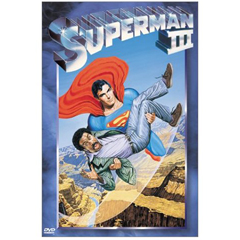
Check out the new movies for next week:

If there are any issues, please feel free to contact us:
VMT Software
1-800-457-7818
You can put the pictures of the movies in, or not. And, you can even make html using a web editor and paste it into the letter to make it even fancier!
Here is what we put in the editor for the invoice part above.. how easy is this!
Hi **CUS:FIRST_NAME**,
Thank you for your business. Below is your recent invoice (#**INP:NEWNUM**).
**TOTALS**
**INVOICE**
And, there is a listing of these tokens available right from the letter editor screen. Of course, if you need help, just give us a ring!
New Backup Program
Our New backup program does what we've been asking people to do... keep multiple backups. It is simple to use and is zip compatible so you're not stuck with having to use our software to restore your data (of course it has a restore and rebuild function built right in!)
It keeps a copy on your hard drive as well as creates a copy on your memory stick (or any external drive) for each day of the week. So if for some reason (not likely) that your data gets corrupted and you backed it up, you'll always have the backup from the previous 6 days (assuming you do your backups everyday). NEW: If you have a web site with an FTP folder, the backup program can backup directly to your online folder.
RSS Feeds
Using the Inventory Utility, you can select any movies by any criteria (for instance select movies you just added today)... .then publish them to an RSS Feed. Advertise your feed on your website and your customers can subscribe to them, then they will see your name on their web browser and they can click on it and get an instant list of your new releases. You can set up links in your inventory so the links are part of the RSS Feed. The links could be to any web site that has information about that movie, either the IMDB or your own web site. It is very simple and cost effective.
For a sample, we have setup a feed that we created from the Inventory Utility. You can subscribe to it or view it by clicking here:

The RSS Feed generator comes with the inventory utility.
Graphs for Quick Views
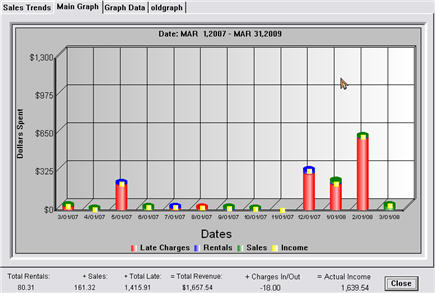
Graphs / Bar Charts / Pie Charts.. are a great way to view your data and have it make sense to you without having to read a bunch of numbers. They are also a great way to make good decisions about what items to keep and what items to sell, or not re-order. Video Shoppe has several graphs in convenient areas of the program
Take a look at just some of graphs by clicking on the graph below:
Gift Cards are available from VMT Software.
Our gift cards are easy to use and very secure. We will make them with your custom artwork. They use a closed system, so you don't need internet, and you don't pay any extra fee's to use them. All you pay for is the actual cards and a small one time fee for the artwork.
Gift cards are a great way to promote your store. Click below to read some articles by Mark Riffey about gift cards. By the way, our gift cards are the private label / Store Only gift cards. And our artwork is much less than a couple hundred bucks. Here is a picture of the gift cards we made for our client New Wave Video...
Note that on the front of the card it represents the store, and promotes the gift card itself, as well as the web site.
On the back is all the store information with the disclaimer, and also an optional QR code. If you have a smartphone you can scan the QR code and it will take you to a pre-set web page on your web site. Go ahead and scan the code above to see the New Wave web page.
Here are some interesting links to learn more about what you can do with gift cards:
http://www.rescuemarketing.com/blog/2008/11/10/sell-gift-cards/
http://www.rescuemarketing.com/blog/2008/04/02/why-should-a-small-business-sell-gift-cards/
On the back is all the store information with the disclaimer, and also an optional QR code. If you have a smartphone you can scan the QR code and it will take you to a pre-set web page on your web site. Go ahead and scan the code above to see the New Wave web page.
Here are some interesting links to learn more about what you can do with gift cards:
http://www.rescuemarketing.com/blog/2008/11/10/sell-gift-cards/
http://www.rescuemarketing.com/blog/2008/04/02/why-should-a-small-business-sell-gift-cards/








Fantastic Features


