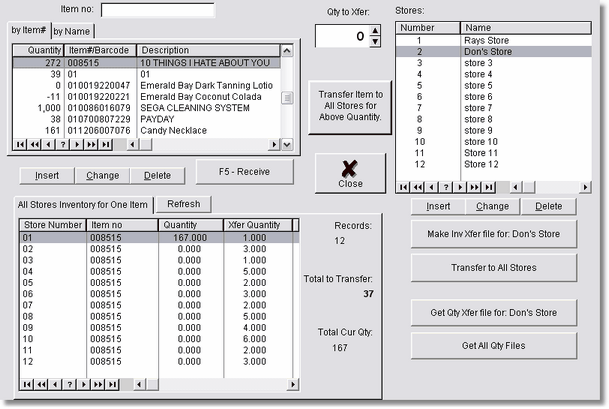
Wherehouse (yes, we know it is spelled differently), is a program that allows you to transfer inventory to your stores from a central location. You can use the internet, a disk, or a local network to transfer the data.
Wherehouse must be installed at the central location (usually the central location), and at each store.
It is a assumed that your inventory (data) at your central location includes all the data from all of the stores. For instance, if I had 3 stores, store 1 has item a and b, store 2 has item a and b, and store 3 has item b and c, the Wherehouse inventory program would have items a, b, and c.
If this is not the case, you can transfer all of your inventory to all of your stores to initialize.
Each day, or whatever time period you choose, there are 3 events that will take place.
1. Each store will upload a complete inventory to your central location, or ftp the data to a web site. The program will handle this for you. The actual inventory isn't getting uploaded, just the ID number, and quantities. This keeps the file small. Remember, your central location has your master inventory in the Wherehouse Program, so the id numbers you upload are also in the master inventory.
2. At the central location, a person will click on a button to download all the current inventories from all of the stores. The store information may be anywhere, on a web site, or on the local computer, or on a disk. (you will have set this up ahead of time).
Once all of the stores quantities are downloaded and merged, then the central location person can start assigning inventory to each store. The program can also receive inventory (into the central location), and create a list of barcodes to print from the barcode printing utility.
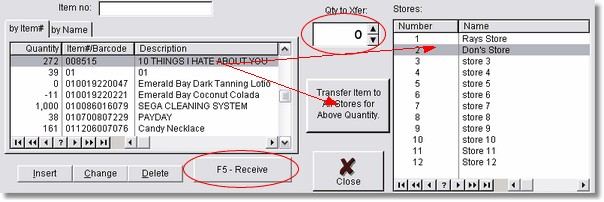
Assigning inventory quantities (or even new inventory) to each store is as easy as drag and drop with the mouse.
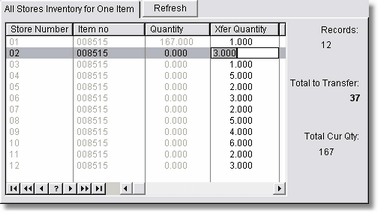
You can also go through each stores inventory for each item, and assign quantities for each store by typing, then pressing the down arrow. This makes it very very fast to assign inventories.
Once you have assigned new inventory for any or all of the stores, you can create the new inventory list for each store, or for all stores, and have it sent to the store, an FTP web site, or even a disk.
3. Each store then downloads their new information from the central location, a web site, or a disk and automatically merges with their current inventory. New inventory is added, and current inventory is updated.
Because you can upload to a web site or a disk, a full time connection is not needed. You can simply use your web site as a temporary storage area for all of the stores files. It is simple and secure. (you would upload to a secure area on your web site).