Security levels allow you to prevent clerks from entering, viewing, deleting, or editing in different areas of the program. Security levels can be changed for most area's that are protected. However, certain area's cannot be changed. For Passwords and passwords security levels screens, you must have a level 9. If you do not enter any clerks (users), you are automatically at a level 9. If you have clerks in your store you should seriously consider entering them as users, and giving them a level 5 or level 7.
Let's say you have an area, like Reconciling the cash drawer. Currently it is set for a level 5. That means that anyone signed in must have a level 5 or higher in order to use the Reconcile Cash Drawer function.
The security levels are pre-set to what WE think is appropriate. Level 7 is for managers, and level 5 is for clerks. However, you may have a clerk that you need to do a manager level function. Set them for a level 6, and lower that function to a level 6.
After you have run the program and understand what different functions do, you may want to change these Security Levels. To change the Security Levels pick Store Maintenance, then choose Password Security levels. You will see a list of all the security level areas for the program.
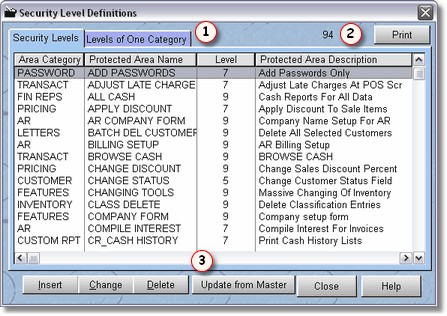
As you can see , there are 94 area's of security (at the time of this writing). When you purchase an update to the program, you will want to click on the Update from Master button
  , so if there are new security area's added to the program, you will have access to them. This way, we can add new area's, and not disturb the security you currently have set up.
Probably the easiest way to find the different security area's is to use the category lookup, by clicking on Levels of one category  . You can then select just One set of area's in which to look through.
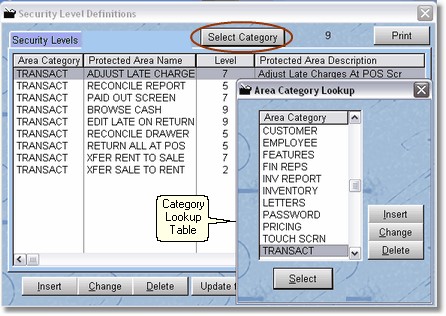
Warning: Do not add your own security level area's or categories.
Once you have found the area you wish to edit, click on change.
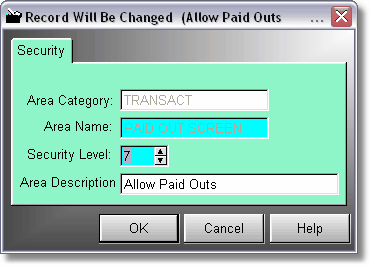
You can now change the Security level, and the description for that area. You cannot change the Area Category and Area Name, as those are how the program knows what record in the Security file to look for.