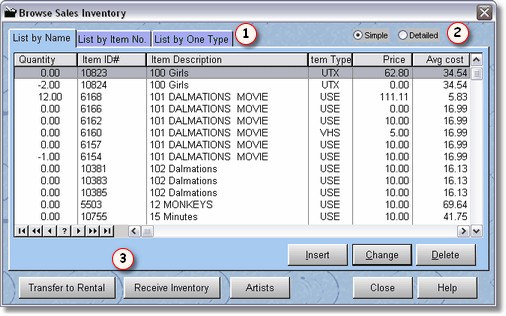
When you are entering sales inventory, this is the screen you should be using. You can use the more generalized Inventory Maintenance, but it will be easier from here.
The sales browse screen is in order of item title. To find an item simply start typing as there is a locator available. If you want to start over, just press the arrow up key on your keyboard.
There are many functions  that are available from this screen that we will discuss later in this chapter.
You may also lookup items by ID number or Item Type. Just click on the Tabs  above.
You may choose the  Simple Form, or the Detailed form for editing or adding inventory from this screen.
Differences between Detailed and Simple Inventory Forms
Unless you are using markups and discounts for customers, there is no real reason to use the Detailed Sales Inventory form, use the Simple Form instead.
The big difference between the Simple Inventory Form and the Detailed Inventory form is the pricing and the costing fields. In the Simple form, there is only one cost field and one price field. Under the hood, when you fill in the cost in the simple form, it is actually the Temp cost in the detailed form. When you first add the cost, it fills in all the costs in the detailed form.
The same goes for the pricing. When you fill in the price here (and save the record), all the prices will be filled in for customer level 0 in the detailed inventory form.