There are reports just about everywhere. There are many reports on the screens where you will be working. For instance, if you go into the Employee Hours area, there are reports there that have to do with employees and clerks. There are history reports on the Customer History Screen when you press F8 from POS Screen 2.
If you are reconciling the cash drawer, there are several reports on that screen, including due lists.
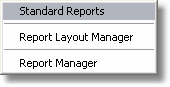
There are 3 main areas of the program where reports are grouped together.
The Standard Reports are " Canned " reports. You cannot change these reports, but they are very flexible as most of them have date filters, media filters, and other filters that you can choose from.
The Report Layout Manager is a report writer. There are several reports, including invoice reports in this section. Currently we are no longer adding reports to this area, because the database that holds the reports would have to get completely replaced on an updated install, thereby wiping out any reports you have made. So, you can go ahead and make reports here, and be assured we won't be wiping them out, because we're not making any more reports here, and we don't install the database over the top of your report database. Report Layout Manager is a VERY powerful report writer.
Report Manager is a report writer that we do add reports to, and if you have a report that you think is relevant, you can email it to us and we'll distribute it so everyone else can use it. It takes some getting used to, but there is a complete tutorial that comes with the program. If we have a report in there that you like, but you want to change just a few things, you just open it up, and do a Save As with a different name. Now you will be working on a copy and you can do whatever you want. These reports are automatically backed up when you do a backup with our backup software.