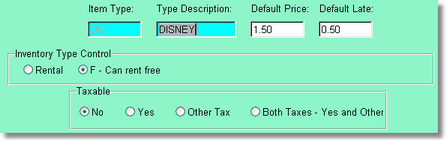
When creating a type for Rentals, you will enter the type abbreviation (up to 3 characters), a 10 character description, the default rental price, and the default DAILY late charge. Notice in this screen the Item type is disabled. This is because you cannot change the actual 3 character item type from this screen. This is a safety measure. You can however change the description and the pricing.
You will also choose the inventory type of either an R or an F. R means the item can not be rented for free if you have free movies coming. F means you can rent this item for free if the customer has free movies coming (otherwise it will rent for the default price).
Choose here if the item is taxable or not. Yes is tax one (in the company setup), Other tax is tax 2, and Both Taxes...
Remember, you only have to enter a price here. The price matrix can override this price if you have a different number of days or different price for certain days of the week.
The Item type is both a price code, and a category. So you could have two prices the same, like NIN for Nintendo, and SEG for Sega, but you would want two different categories (item types) because you will be reporting on them, or looking them up by item type. You would also put your NEW (new release) and CAT (category) or REG (regular) item types here.
Note: Rental types determine the price as there is no price in a rental item. All other items in the system (sales, coupons, memberships, etc.) have a price in the item itself.