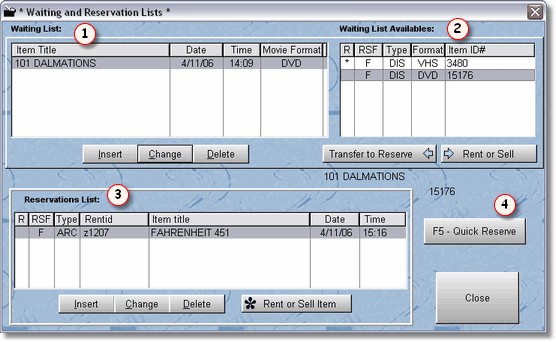
This screen will let you add or delete items on the waiting list, reservation list, or transfer from the waiting list to the reservations list. You may also directly rent from either the waiting list or the reservations list.
A waiting list is by item title. A customer is on a first come first serve basis, and when the title (by name) comes in, the clerk will be notified there is a customer waiting for that particular title. Generally, once the customer has been notified their item is available, the clerk may want to transfer one of the items that matches the title to the reservation list. The reservation list is by id number, and indicates the physical item is reserved. Normally a clerk might want to put it behind the counter until the customer picks up the item.
In the above screen, you may add an item to the waiting list by clicking on the insert button for the waiting list table  . Then you will notice to the right of the waiting list table
  there is a list of all the items with that title, along with their ID number, and format (DVD, VHS, Etc).
You may transfer one of the physical items from the Waiting list id numbers into the reservation list  by either highlighting the item and pressing the transfer to reservations button, or just grabbing the item with the mouse and dropping it into the reservation table.