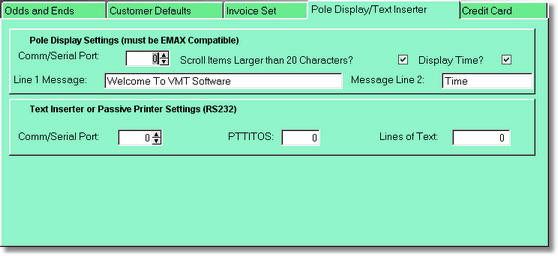
The Pole Display we are programmed for is a 2 line, 20 column (per line), 40 character, RS232, Emax compatible display.
Make sure your pole display is set to Emax mode. Set up your comm port, 1 - 4. The Line 1 message is the normal message when you are not doing a transaction. When selling or renting items, the item will appear in line 1. If you have the scrolling turned on, items with titles longer that 20 characters will scroll so you can read it once in it's entirety, then it will just show the first 20 characters. If scrolling is off, it will show just the first 20 characters. This is the faster method.
If you display the time, it is displayed in the right most part of the bottom line. The words time will display in the left most columns on line 2.
During a transaction, the 2nd line will display the quantity and the price.
When a transaction is completed, the total will be displayed, then the change for a brief period of time, then it will go back to displaying your company name at the top.
Text Inserter
This is a device that hooks to the RS-232 serial port. It is capable of taking data of a transaction and overlaying it on top of video. That way you can have video of your workstation, and the transaction data is overlayed over that video during a transaction. You will also need a Digital video recorder to record video all day long.
You can also hook in a passive printer, and the same data will be printed to the printer instead. It would look more like a transaction log. A 40 column RS232 printer is required for this.