To access, go to Store Maintenance, Password Maintenance.
Note: If you select Add Passwords from store maintenance, you may only add passwords for the level you are signed in on, and below. This feature is for managers, so a manager with a level 7 could add a password for a new employee.
Press Insert or change from the Password browse table.
Clerk Name and User Name are the same thing. Each clerk or user can have, or not have, a password. The user name is not case sensitive, however, the passwords are case sensitive.
Before you start entering your clerks, be sure to enter YOUR name with a level 9. We suggest you enter yourself as a level 9 with a password (don't forget it!). And enter yourself with a different user name as a level 5, with or without a password.
It is not completely necessary to add passwords for all of your clerks, just a user name and a level (normally level 5). You will have the same security for entering different places in the program for all clerks, so it doesn't matter, unless you are worried that one clerk might enter a different clerks name for a transaction, and that only matters if you have 2 clerks using the same drawer.
However, for managers at a level 7, you should give them a password.
If you have more than one person using a cash drawer you may want to track each transaction by clerk. You can set the program up to automatically ask for a new clerk before each transaction in the Company Setup Form, or the clerk can press the F9 key before they do any transactions.
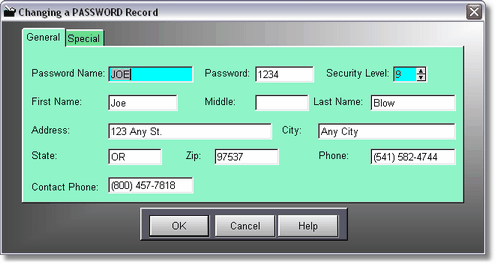
Enter the users name or initials, up to 15 characters. Each user must have a different name. The password is optional, and you can enter up to 10 characters. Remember, the password is case sensitive. If you are going to use the information for reporting of hours, commissions, etc., it is a good idea to fill out the rest of the information.
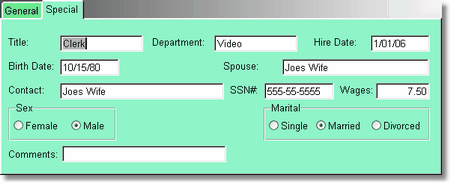
If you click on the Special Tab, you can enter pertinent employee information.