The Operating System must be an NT based (Windows XP or Windows 2000) LAN (local area network)
You Must have our network version of VMT Software.
Although it may work with different versions of Windows on each computer we recommend all computers have the same version of Windows.
For Windows Networks you need:
2 or more computers.
1 network card for each computer.
Ethernet Router with cables.
Some people have used a cross wired cable for two computers (No Router) with good success, but we have seen problems with this method.
A computer person to hook up and test the network!
After the network is hooked up and running install the program on ONE computer. Then share the entire drive (usually drive C) with all rights. There are other ways of doing it if you are really worried about security, but most of our stores use this method. This computer will be known as the server.
On all workstations (the computers that are not the server), you must map to the server drive. We try to get everyone to map as drive V:, for consistency sake, but you can make it any letter you like. If you have more than one workstation, map to the server as the same drive letter.
From the 2nd, 3rd, 4th computer(s) log on to the first computer using Windows Explorer.
Different versions of Windows may have a setup that is not the same as the example.
From a workstation, go to Windows Explorer and click on drive V:. Find the vmtvid folder, in the folder find the wvid.exe program, right click on it and click on Send To Desktop to create a shortcut on your desktop. Do this on each workstation.
Right click on the shortcut on the workstation and click on properties.
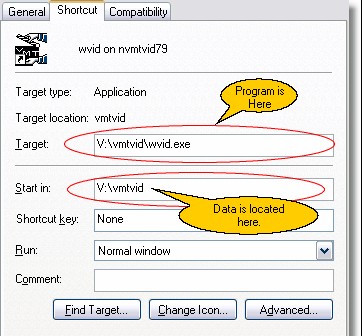
In the above case, the server is drive V. Notice it does not say \\servercomputer\vmtvid\wvid.exe, because I have my server drive mapped.
Notice also I did not map a drive to the folder, I mapped to the entire C Drive on the server computer. If your shortcut says v:\wvid.exe and it runs the program, it is because you mapped to the folder instead of the entire drive. I am writing this mostly for your technicians that know that they should be able to map to just the folder. However, we have graphic files and sound files in other folders off of the root folder, so this is the way to do it. We may change this in the future.
Even if you are a genius technician, please feel free to call us. It will save you and your customer time and money.