When you hook up camera's on a Local Area Network (LAN), things get very interesting. If you only have one computer on the network taking pictures, you just use the single cam setup and you should only be taking pictures from that computer, however each computer needs to be setup as a different Camera Station.
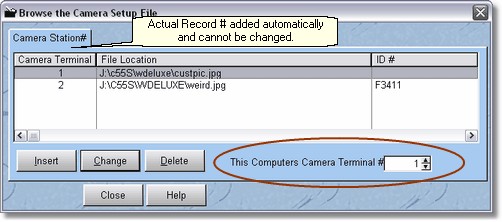
If you have a camera on each computer, you need a file to store that computer's temporary picture on, until it is stored in the database. Normally you will want to store the picture on the local computer. If you did not install the program on this computer because it is a workstation, the custpic.jpg file is probably not anywhere on this computer, so you will have to create a folder, and copy the custpic.jpg file from the Server into that folder, or you can just find an unused jpeg file somewhere on your computer and use that, it doesn't matter the name, just as long as it's a .jpg file.
Then, you set this computers camera terminal to match the file. So in our above example, if I want the weird.jpg file to be my temporary file, I would set this terminal to 2. You can't change the Camera Terminal Number in the camera setup file, it is assigned automatically.
You will see that when you add or change the terminal record, it is the same form as the Camera Setup for one user.