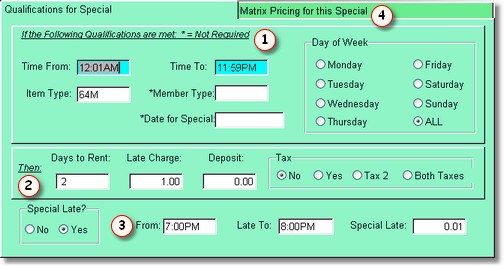
NOTE: Price matrix records are not needed unless you need to overwrite a price, or the number of days to rent, or a late charge. The first place the price comes from is the price in the item type record. The number of days to rent comes from the Company Setup Form. And the daily late charge comes from the Item Type record.
The first (top) part of the screen are the Qualifications  the program looks for in order to select prices for this matrix record. This means that the time from and to, item type, possibly the membership type, and either the date or day of the week must match in order for the prices or late charges to be used from this matrix record.
In this case, the time is all day long, and all days of the week is checked to it can be any day of the week. However, the item we are renting must be a NEW Item type. It can be any customer because a membership type is not displayed. If you only wanted this to qualify for a certain membership, just type in the membership type. You could have a special price for senior citizens for example.
When you are renting a movie, the program will search search through the price matrix records to see if there is a qualifying item.
Once the program has chosen this record to overwrite the normal price with,  the program will change to this number of days to rent, unless you put a zero in here, then it will default to the number of days to rent on POS screen 2.
NOTE: You do not have to put in every day of the week if you have one or more days that have a different price, but not all. You could have a price for Wednesday, and a price for Thursday, and a price for All. Assuming today is Thursday, if the program finds Thursday first, it will simply use that price. If it finds an All, it will remember it, search for a Thursday, if it doesn't find it (if today were Friday), it would go back to the All price. That means that one All does NOT conflict with another special for a specific date or day of the week. However, if you have 2 Thursday specials for the same time and same item type, there would be a conflict, and the program would choose the one that got added first.
Late Charges
You should always put in a late charge if you have a special price matrix record. You can have different late charges for different days of the week. I could have a late charge on Monday different from all the other days of the week by putting in a matrix for Monday for New and and ALL for new. However, late charges for the price matrix are only calculated if you have that many days in the count back section in the Company Setup. Otherwise the program will take the late charge price from the item type, and multiply it by the number of days late. The count back of days actually adds each day late, Mondays late charge, plus Tuesday's late charge, etc. Remember that this takes more time (not that you will probably notice). It is safe to put in a count back of 14 days in most cases. But if the item is over 14 days late, it will simply multiply # of days late by the standard late charge in the item type.
The special late charges are only good for the day the movie is brought back. It still uses the requirements , but the movie must be late today, so the times you put in the special late should be later than your standard due time. This is great if you want to give the customers a break if they are only an hour or two late.
Click on the Price Matrix  Tab to edit the actual prices.