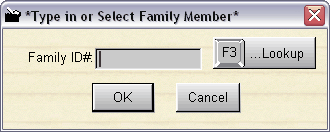
Pressing or clicking on F3 selects the family id number. You can either type or scan in the family ID. The family members name will show up on the top left of the POS2 screen. The family ID will be recorded in the history items so you will know who actually rented the items. To lookup or add a family member press or click on F3 again. If you have selected a family member, and wish to NOT have them selected for the transaction, press F3 to get the screen above, then press ESCape or click Cancel.
NOTE: If you do not use a scanner, it makes it easy to lookup family members by simply pressing F3 twice from the POS screen.