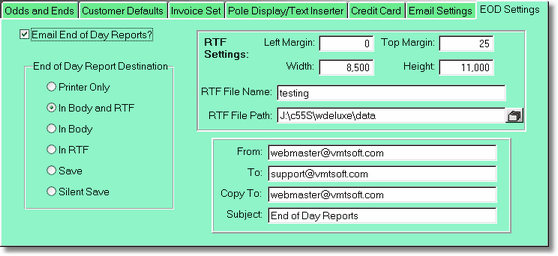
There is a security setting under Transact called Reconcile Preview. This is used to force the preview automatically if the clerk doesn't have a high enough password level. Because the preview is forced, the above settings can cause the preview to be saved or emailed. If you have a higher password level, you will have to click the email button inside the preview screen to email or save the report. This is a security measure that will catch your clerks previewing when they are not supposed to. It is also a way for you to automatically get your reconciliation reports at home or your office emailed automatically.
Because the email doesn't use your client email program (outlook, outlook express, Eudora, etc.), you need to setup your email settings before this will work.
Basically the program will email you a .wmf file (a picture of your report), inside of an RTF file, a word processing file. You might find it will print out fine with Word, but the Word Pad program may not print the file out as would be expected. You can also print out a good copy by using the viewer that comes with Windows Explorer. The RTF File will be saved in the file you set up in the above screen. Testing may not be a good name. I would call it EOD Report or something like that.