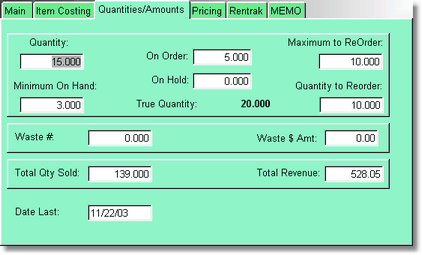
Quantity is the actual quantity you have in stock. The true quantity adds in the quantity you have on order, and subtracts the On Hold. On Hold would be inventory you have saved for an order, like a pre-sold item.
If you don't care about keeping a Quantity, no problem. Just leave it zero. The program will just let the quantity go negative.
If Minimum on Hand is filled in, then this item will show up on reorder reports when the quantity is less than the minimum on hand, and it will display the quantity to reorder.
Waste # is the quantity of wasted or broken items, and Waste $ Amount is the total amount of the wasted or broken items. This is for you to fill in at this time. In the future we will have a button to enter a waste amount.
Total Qty Sold shows total sold, and if it was a rental item before, it includes the total number of times the item was rented. Total revenue is the total amount this item has brought in.
Date Last is the last date there was a transaction with this item.