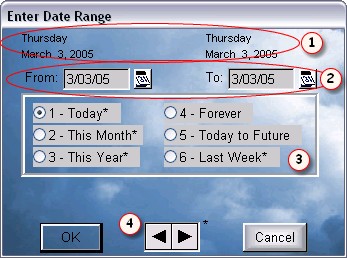
The date range selection screen lets you select date ranges quickly and easily. Many reports and some browses use a date range to decide what data to display.
At the top (1) are the full days and dates of the selected dates. You select the dates From: and To: (2) in one of many ways.
You can simply click in the date field and type in the date(s). You can click on each calendar button and use the built in calendar to select the date(s).
You can click on one of the pre-set options (3). Click on Today, This Month, This Year, Forever, Today to Future, or Last week and the dates will be filled in automatically. If you have selected one of the options with an asterisk *, you can use the left/right buttons (4) to advance or decrease the date range by the selection you made. If you had selected a range of "This Month", the date range would increase or decrease a month at a time. This will not work if you select the dates manually.
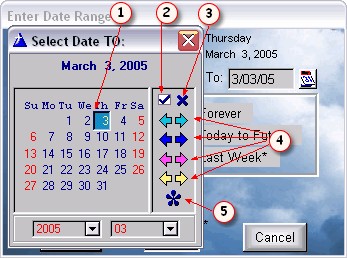
To select a date, click on the date (1) and double click, or click on the date and press (2). To Cancel click on the x (3). You may advance or decrease the calendar by Year, Month, Week, Day (respectively) with the left and right arrows (4). To select today's date, click on the * (5).
If you forget (which you will) what the buttons are for, just move your mouse over the top of them, and a caption will display for a few seconds explaining what the button is for.