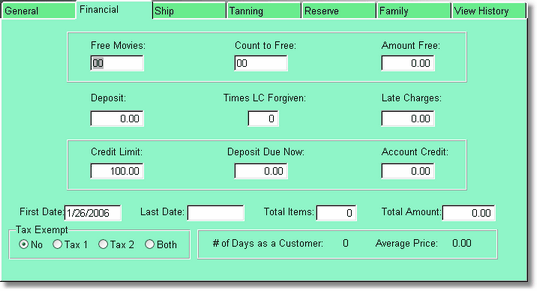
This page displays the financial information for a customer. Video Shoppe fills in this information for you as transactions take place. This page is password protected to keep clerks from seeing or changing this information.
The fields on this page are automatically filled in by the program during transactions.
Free Movies
This page shows the number of free movies coming. If you are using a special like rent 10 get one free it will show the count to get one free. Amount free is how much is counted towards a free movie if you have that option turned on in Company Setup.
Deposit, Times LC Forgiven, Late Charges
If a deposit has been required on an item or items it will show the amount of the deposit collected. This will be due back when the item is returned.
If late charges have been forgiven, Video Shoppe will show how many times.
If there are late charges due, the amount will be shown here.
Credit Limit, Deposit Now Due, Account Credit
Credit Limit, permits you to set a charge limit for each customer. Enter the amount of money the customer will be allowed to charge. Choose credit CR as your type of payment from the POS Screen 2.
If you owe a deposit to a customer that amount is shown. It will be returned on the next transaction as change.
If the customer has a credit you owe them, or they owe you it is shown here. If it is a negative number, they owe you money. Positive means you owe them money. Think of it as if you are the bank.
First Date, Last Date, Total Items, Total Amount.
The first date the customer was in, the last date they rented, how many items they rented or bought and the total amount spent by this customer are shown.
Tax Exempt
If you have Tax Exempt marked as anything but NO, the customer will be tax exempt for that tax. So if they were marked as tax exempt Tax 1, they are exempt from Tax 1, but they must pay taxes on Tax 2, if there is a tax 2.
Note: Some Inventory forms may still have the Tax as No, Yes, Other, or Both. " Yes " is the same as Tax 1, and " Other " is the same as Tax 2.
# of Days as a customer, Average Price
The # of days as a customer is calculated from the first date to today's date. The Average price is calculated by dividing the Total Amount by the Total Quantity.