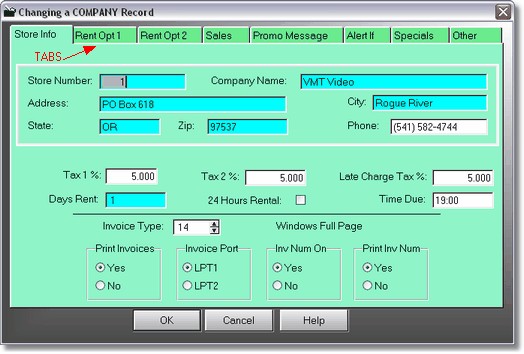
Here is where you set the basics, Company name, address, city, state, zip, phone. Taxes are already in percentages, so just type in the tax 6.3, not .063.
The default # of days to rent and the time due are setup here. (The time due shows in 24 hour time, but you can type in 6:00pm and it will convert it for you.) Remember, this is the default # of days to rent, you can bypass this on the rental screen and in the price matrix.
If you check the 24 hours rental, Time Due will change to Grace period. Movies will then be rented for a 24 hour period (per day) plus the grace period from the current time. So a movie rented at 2pm with a 2 hour grace period for 2 days will be due in 50 hours from now.
Set print invoices to yes or no. If you set invoices to no, you can still print an invoice by pressing CTRL Enter.
If you are using a DOS invoice or an invoice that bypasses the windows print engine (like # 32), you must select the Invoice Port. If you are going to print to a printer that is setup in windows, this setting is irrelevant.
If you have invoice numbers turned on, the program will generate a new invoice number for each invoice printed. Click on Print Inv Num On to print those numbers on the invoices.