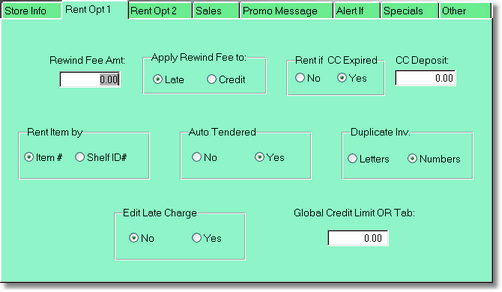
Rewind fees can be added to the late charge or the customers account. If you put an amount in the Rewind Fee, the program will ask you on each return if you want to add a rewind fee.
If you set Rent if CC is expired to NO, you will not be able to rent to the customer if they do not have a valid non-expired credit card in the customer record, unless you have a deposit filled in. Then the customer will be charged an automatic deposit for each item rented.
If you just want to be notified only when you are going to take a credit card, let this option be Yes, then set the alert if CC expired to On.
Normally, you will set Rent Item by item number. However, if you have 2 numbers on your movies, you can rent by the unique shelf ID.
Auto tendered will fill in the amount tendered to the total, so you don't need to fill it in. But remember, your change amount will always be wrong. We recommend this be turned off.
When you create duplicate inventory, (you have more than one of the same title), you can have the program create the duplicate inventory by numbers (1001, 1002, 1003, etc.), or by letters (1000a, 1000b, 1001c, etc.)
If you turn on Edit late charge here, you are allowing clerks to edit the late charges as they are returned, and before it comes into the system. That means there will be no way of knowing there was ever a late charge. It would be better to later forgive the late charge at the point of sale in history.
The global credit limit allows all customers to be able to charge on their account, up to the global limit.