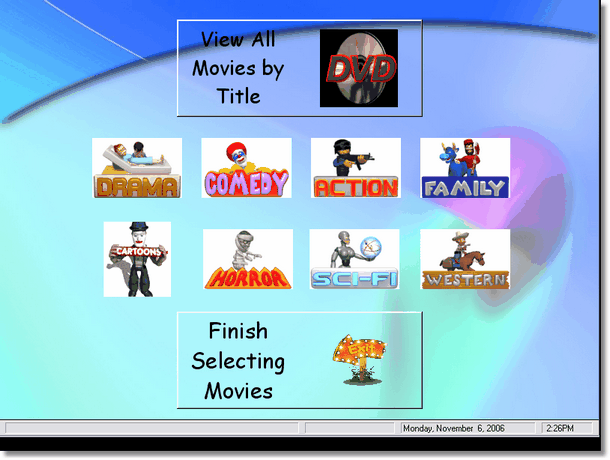
This is the menu for your customers to select what kind of movies they would like to browse. The can simply press the appropriate button and they will be taken to the Browse Movie screen.
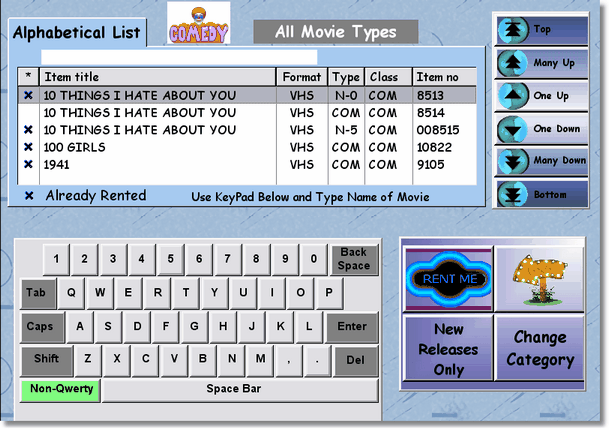
Although this screen should be self-explanatory, we will explain it anyway. To search for a movie, just start typing using the on screen keyboard. If the customer (or clerk) is not used to a standard keyboard, they can press the Non-Qwerty button which will display the letters in alphabetical order. Like everywhere else in Video Shoppe, as you type, the item will display on the screen. When you've found the item, just press or click the Rent Me button.
You may select a different category, or select just New Releases by click on those buttons (lower right hand corner of the screen). The New Release button when selected will show only new releases for the current category. You can change categories and only see the New Releases. If you want to see everything, then the New Release button would have changed to All Movie Types, so you can press that button to show all movies, New or Old.
When you are finished, just press the exit button.